Shady Job HUD and Controls
Green bar, slots 1 and 2, plunger prompts — no guessed key binds.
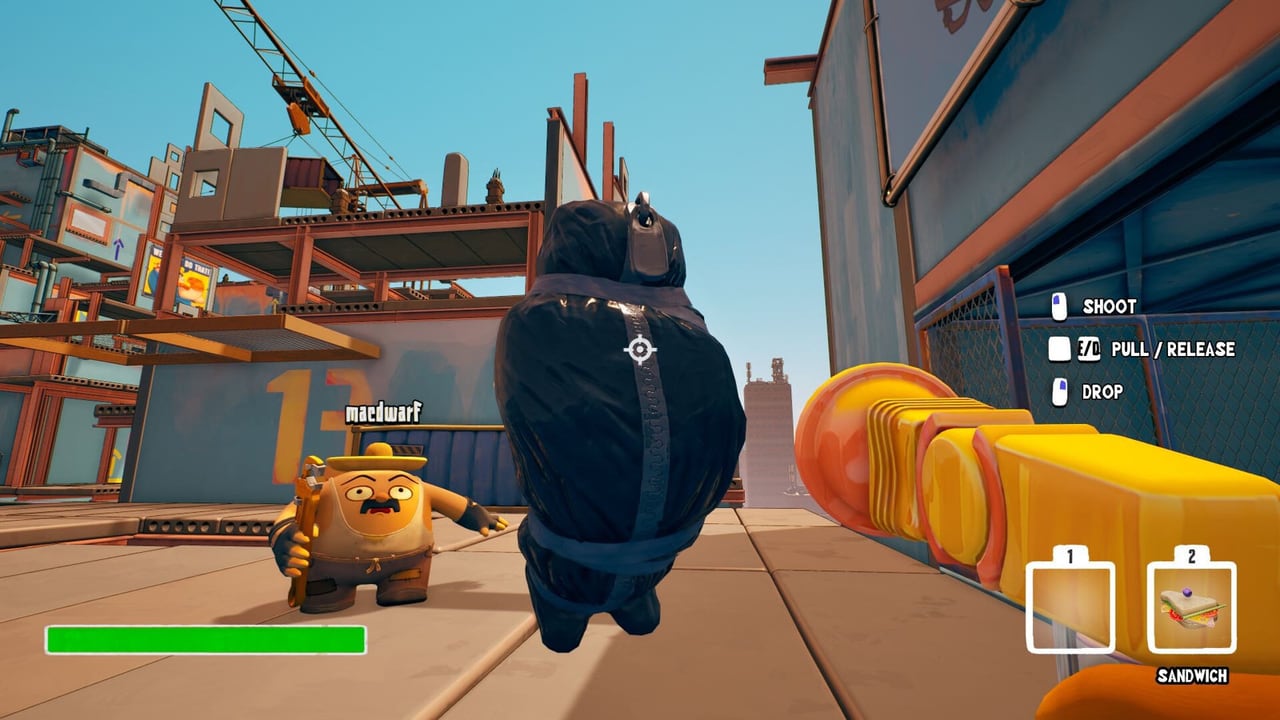
This page documents the Shady Job interface from official screenshots and store copy. It does not publish a keyboard table. GAZE IN GAMES has not posted a public bind list for the September 10, 2026 Steam launch, and playtest layouts can still change. If a streamer flashed a key, treat it as their overlay, not a wiki fact. Open in-game settings when the title unlocks and bind there. If you use a controller, use Steam Input rather than copying glyphs from another physics party game.
If you have not clocked in yet, read Getting Started first. This page is the HUD layer on top of that brief.
What the HUD actually shows
Official shots show cartoon construction workers in hard hats on an unfinished high-rise. Bottom-left of the screen sits a green bar. Two hotbar slots sit in the same neighborhood, labeled 1 and 2. Those numbers are slot indexes, not confirmed keys. Do not assume 1 and 2 on the keyboard until the settings screen says so.
Items visible in those slots in official art include a SANDWICH and an INDUSTRIAL FAN. Other shots show crews carrying a toilet and a barrel as physics props, and ice thick enough to freeze a teammate solid (one nametag reads Valentine). Treat sandwich, fan, toilet, barrel, and ice as observed, not as a stat table. Effects are still being catalogued pre-launch. Do not plan a rotation around guessed healing, blast radius, or fan output.
The green bar is clearly a status readout. Official materials do not name it as health, stamina, or bag-calm. Until the launch HUD labels it, call it the green bar and watch it when the bag starts a fight or when someone eats a fall. If it drops while you are slamming cargo, stop slamming cargo — that lesson belongs on the body bag page, not in a fake meter formula.
Plunger Gun overlays
When the Plunger Gun is up, official overlays prompt SHOOT, PULL / RELEASE, and DROP. Those four words are the only plunger actions this wiki will print as controls.
- Shoot puts the cup on a surface, the bag, or a teammate in trouble. That is how you climb unfinished walls, pin cargo, and start a rescue.
- Pull / Release is the tension control. Pull to close distance or haul a body. Release when the line is dragging the structure or a person into a drop.
- Drop lets go. Use it when the line is the problem, not when you panic-drop the bag off a floor-13 ledge.
The longer playbook — climb, bag yank, teammate rescue, and the industrial fan sitting in slot 2 in screenshots — lives on the Plunger Gun page. Do not invent a secondary fire, a charge shot, or a damage number for the fan.
What we will not list
No movement-key table, no interact-key table, no drop-item table, no emote list. Steam tags the game as first-person, cartoon, and physics, which matches the shots, but tags are not a bind sheet. Steam lists Online Co-Op, Steam Achievements, and Family Sharing. It does not list local split-screen, so do not look for a couch-split toggle in the same menu as mouse sensitivity.
In-game chat and online interactivity are listed as interactive elements on the store. That is not a full voice-design document. Bring a voice channel for a four-stack anyway; the co-op page covers why callouts matter more than a pretty bind.
Steam Input and launch-day settings
On September 10, 2026, open settings before the first bag pickup:
- Confirm look sensitivity and inversion. High-rise work punishes a wild mouse more than a slow one.
- Bind the Plunger Gun actions to whatever your hands already own, then say the on-screen words in voice (Shoot, Pull, Release, Drop) so the crew shares a language.
- If a controller is in the chair, enable it through Steam Input. Do not assume an automatic layout from HELLMART or from Peak.
- Check whether slots 1 and 2 have dedicated binds. If they do, map sandwich and fan only after you have seen their real prompts in a session.
- Revisit binds after the first collapse. The building page is where structure failure is explained; this page is where you admit the bind made you drop a block into the span.
Playtest waves used random Steam invites and a post-session survey in the menu. That survey is not a controls screen. Historical invite rules are on the playtest recap. After launch, bind changes and HUD tweaks belong in patch notes.
How the HUD fits the job
A clean first session is still grab, build, climb, bury. The HUD only tells you whether that loop is healthy. If slot 2 shows the industrial fan, someone on the crew should own it instead of everyone fighting over the bag. If a teammate is a block of ice, stop building a bridge through that patch and read the walkthrough notes on ice and electric hazards. If the green bar is in free-fall while the bag is in free-fall, you have a carry problem, not a rebind problem.
Solo players should still learn the plunger prompts; there is no listed split-screen partner to catch you. Duos should decide who is allowed to Shoot at the bag versus who Shoots at walls. Four-stacks should not all stand in the same overlay — one plunger on the cargo, one on the next climb, one watching the drop. Role split is argued on roles and planned on the squad planner.
When in doubt, believe the on-screen prompt, not a wiki table that does not exist. Other how-tos sit on the Guides Hub. The preview talks about the joke and the Peak comparison; this page is only the chrome between your hands and Punchy Bag.
Frequently Asked Questions
Quick answers to the most common questions.
What are the Shady Job key binds?
This wiki does not invent them. Confirm binds in the in-game settings when the game unlocks on September 10, 2026. The Plunger Gun page only documents Shoot, Pull / Release, and Drop.
What do hotbar slots 1 and 2 hold?
Official screenshots show a SANDWICH and an INDUSTRIAL FAN. Effects are still being catalogued. See Getting Started for how those slots sit in the first-session loop.
Does Shady Job support a controller?
Use Steam Input and verify the layout in settings at launch. Do not copy binds from another game. Party setup notes are on the co-op page.
Is there local split-screen in the control menu?
Steam does not list local split-screen. The listed features are Online Co-Op, Achievements, and Family Sharing. Plan seats with the squad planner.
What is the green bar in the corner?
Official shots show a green bar bottom-left. Materials do not name it. Watch it during bag fights and falls; handling notes are on the body bag page.